LPL Criteria can be used to score your Plan's fund lineup. There are 3 different criteria types -- Active Fund, Passive Fund, and Target Date Fund scoring. Active Fund criteria are always on. Passive and Target Date Fund scoring can be turned on optionally on a Plan basis. Below is an overview on accessing and using each criteria type.
Accessing Plan Info
- Access the Plan List screen by clicking Plan List in the navigation menu at the top of the page.
- Click on a Plan Name.
- Click the hamburger menu icon in the upper left-hand corner next to the FirmPlus logo. The menu will slide in from the left.
- Click the Setup option toggle.
- Click Plan Configuration and then LPL Criteria in the expanded menu.
Active Fund Criteria
Active Criteria is the default criteria type for Plans. The entire fund lineup for your Plan will be scored using Active Criteria unless you have turned on Passive Fund or Target Date Fund scoring.
Using Active Fund Criteria
- As a default when arriving on the LPL Criteria screen the Active Fund criteria will be displayed.
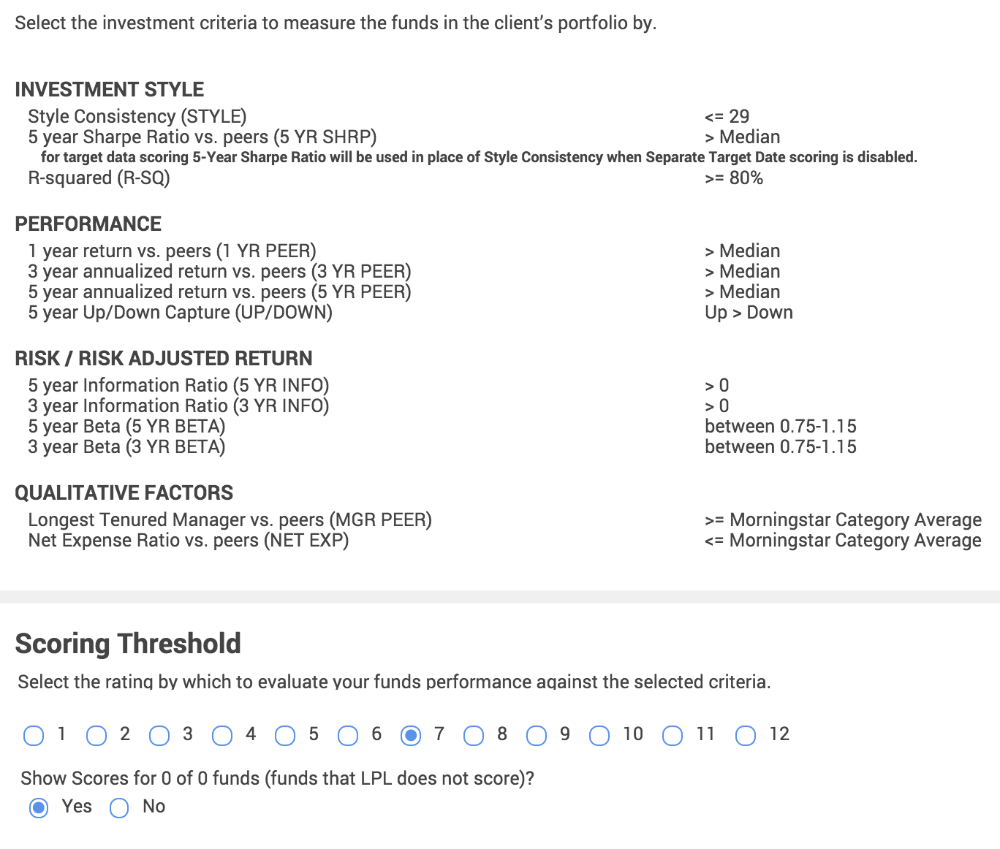
- The LPL Active Fund Criteria are automatically selected.
- At the bottom of the screen set the Scoring Threshold. This defines how many of the selected Evaluation Criteria need to be met for a fund to be considered "Passing". For example if you set the Scoring Threshold at "7", at least 7 of the 12 criteria selected must pass in order for a fund to be considered "Passing".
- You can optionally set to show or hide scores funds which LPL does not score.
- Click Save in the upper right-hand corner to save your changes.
Passive Fund Criteria
Passive Fund Criteria is an optional scoring feature. When enabling this feature you can set Passive Fund criteria that will apply to only Passive funds in your fund lineup. When using this feature, report sections that produce fund criteria data will separate Passive scored funds into their own segment within the report section.
Using Passive Fund Criteria
- Check the Enable Separate Passive Fund Scoring checkbox. This will activate the Passive tab to the right of the Active Tab.

- Click the Passive tab.
- The LPL Passive Fund Criteria are automatically selected.
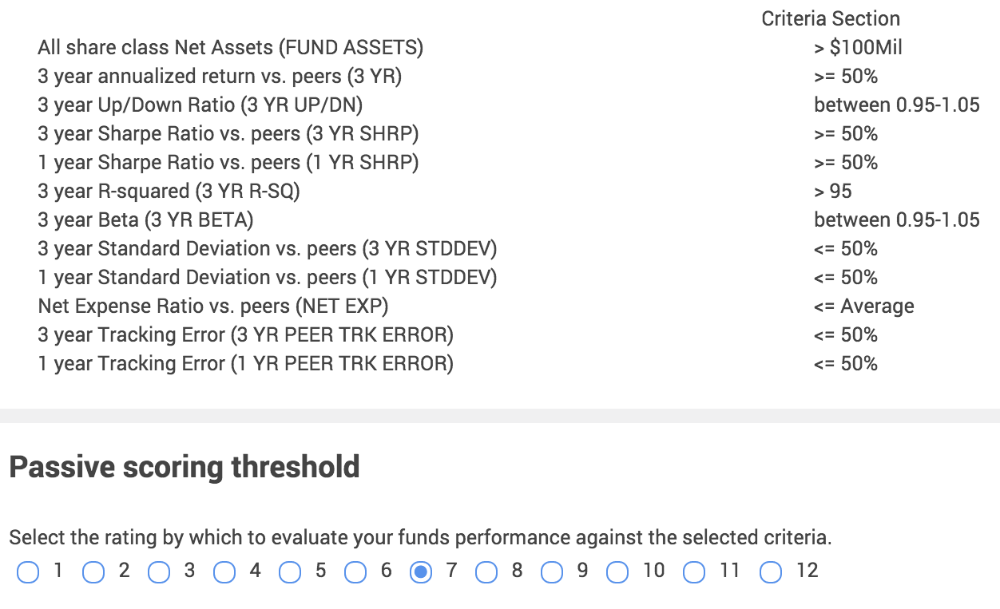
- At the bottom of the screen set the Scoring Threshold. This defines how many of the selected Evaluation Criteria need to be met for a fund to be considered "Passing". For example if you set the Scoring Threshold at "7", at least 7 of the 12 criteria selected must pass in order for a fund to be considered "Passing".
- Click Save in the upper right-hand corner to save your changes.
Target Date Fund Criteria
Target Date Fund Criteria is an optional scoring feature. When enabling this feature you can set unique Target Date fund criteria that will apply to only Target Date Funds in your fund lineup. When using this feature, report sections that produce fund criteria data will separate Target Date funds into their own segment within the report section
Using Target Date Fund Scoring
- Check the Enable Separate Target Date Fund Scoring checkbox. This will activate the Target Date criteria tab.
- Click the Target Date criteria tab.

- The LPL Criteria Importance Factors are automatically applied.
- Enter the Objective Importance Factor for each Target Date Fund Criteria set. The Objective Importance Factor weights the criteria selected and will weight the calculated Fund Ranking Score. Your Importance Factor weights must add up to 100.
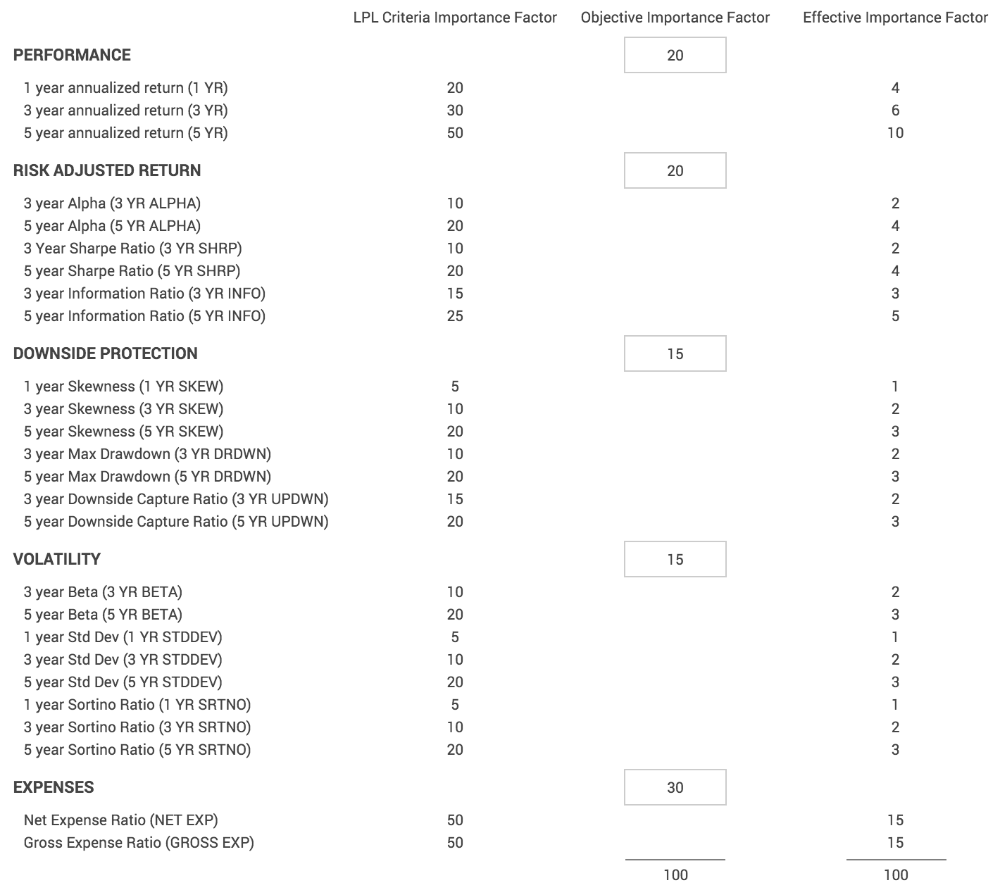
- Set a Score Scale.
- Set the score scale to be the same scale as your Active and Passive Fund scoring. For example, if your maximum points are 12, then set your score scale to "12".

- Set the score scale to be the same scale as your Active and Passive Fund scoring. For example, if your maximum points are 12, then set your score scale to "12".
- Set the Scoring Threshold. Set the threshold at or a little above the 50% of your Score Scale. By definition, since there are less than 50 Target Date funds per year range, only 5 funds would be in the top 10% of funds.
- The chosen threshold will give a passing rating to funds that score above the threshold, and a failing rating for funds that score below.
Setting Target Date Series Weighting
The option to weight individual Target Date years to be used in scoring the TDF Series is available. Usually this weighting is set based on plan demographics like number of participants within each target year range.
- One the Target Date Criteria Tab scroll to the middle of the page where it states Target Date Series Weighting.
- Click the Enable radio button.

- Set the Target Date Series Weighting for each fund in the TDF Series
- The total must add up to 100.
- Click Save in the upper right-hand corner.